
Zawadika Bet Kenya mobile app
Download the Zawadika mobile app for Android or iOS and bet on KPL, EPL, play Aviator, deposit via M-Pesa—all from your phone in Nairobi, Mombasa, Eldoret. The app weighs just 15MB, works on 3G networks, processes M-Pesa deposits in under 10 seconds, and lets you cash out live bets with one tap.


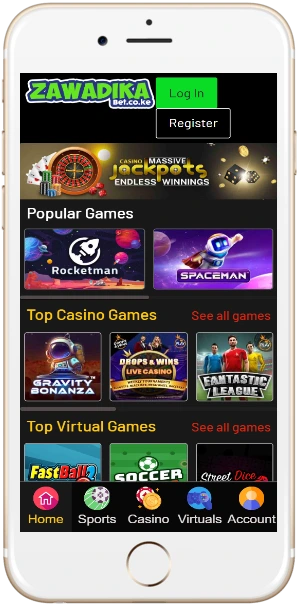
Why Kenyan bettors use the app
Lightweight installation
The APK file is 15MB for Android, iOS version sits at 18MB. Compare that to some competitors pushing 45-60MB—Zawadika installs faster on budget smartphones common in Kenya (Tecno, Infinix, Samsung A-series). Runs smoothly on Android 6.0+ and iOS 12+, doesn't hog RAM or drain battery like heavier apps.
3G network optimization
App compresses data to work on slower connections—useful in areas outside Nairobi CBD where 4G coverage drops. Average bet placement uses 120KB of data; loading the sportsbook home screen takes 250KB. You can place 50-60 bets on a 10MB bundle if you're not streaming live matches.
M-Pesa instant deposits
Tap Deposit, enter amount (minimum 50 KES), approve the M-Pesa prompt on your phone. Funds appear in your account within 5-10 seconds—no waiting, no manual confirmation needed. Withdrawals to M-Pesa process in 15-45 minutes weekdays, bit longer on weekends but still faster than bank transfers.
One-tap cash-out
Live bets show a green Cash Out button when available. Tap it, confirm, money lands in your balance immediately. Works great for KPL matches when you've backed Gor Mahia at good odds and they go 1-0 up—you can secure profit before the opposition equalizes.
Biometric login
Set up fingerprint or face unlock during first login. After that you open the app, scan your finger or face, you're in—no typing passwords every time. Saves maybe 15 seconds per session but adds up when you're checking odds multiple times daily.
Push notifications
Get alerts for bet settlements, bonus offers, KPL match kick-offs, EPL goal updates. You control notification settings—turn off everything except bet results if promotional pings annoy you. Notifications arrive reliably on both Android and iOS without the delays some apps suffer.
Installation steps
Android setup
Click the Android download button above or visit zawadika-kenya.com on your phone browser. The APK file downloads automatically. Open your phone's Settings, go to Security, enable "Install from Unknown Sources" (some newer phones call it "Install Unknown Apps" and you enable it per-browser). Find the downloaded APK in your Files app or Downloads folder. Tap it, hit Install, wait 20-30 seconds. The app icon appears on your home screen; open it and log in with your existing account or register new.
If installation fails, check you've got at least 50MB free storage—the app needs extra space during install even though final size is 15MB. Also make sure you're running Android 6.0 or newer; older versions aren't supported.
iOS installation
iOS users have two options. First option: download directly from App Store by searching "Zawadika Bet Kenya" (if available in Kenyan store). Second option: install via the website—visit zawadika-kenya.com in Safari, tap the download iOS button, follow the profile installation prompts. You might need to trust the developer certificate in Settings > General > Device Management after install.
Some iPhone users report the "Untrusted Enterprise Developer" message on first launch; just go to Settings > General > VPN & Device Management, tap the Zawadika profile, hit Trust. Then the app opens normally.
App versus mobile site
| Feature | Mobile App | Mobile Website |
|---|---|---|
| Installation required | Yes (15-18MB) | No |
| Load speed | Instant (after install) | 2-3 seconds per page |
| Data usage per session | 120-250KB | 400-600KB |
| Push notifications | Yes | No |
| Biometric login | Yes (fingerprint/face) | No |
| Offline access | View bet history, account | Requires connection |
| M-Pesa integration | Native (faster) | Browser-based |
| Works on 3G | Optimized, smooth | Works but slower |
The app makes more sense if you bet frequently—maybe daily or multiple times per week. The mobile site works fine for occasional bettors who don't want to use phone storage. Functionally they offer the same markets, odds, payment methods; the app just delivers a faster, more data-efficient experience.
System requirements and app details
Android version
Minimum OS: Android 6.0 (Marshmallow)
Recommended: Android 9.0 or higher
APK size: 15MB
Storage needed: 50MB (install process)
RAM: 1GB minimum, 2GB recommended
Processor: Quad-core 1.2GHz or better
iOS version
Minimum OS: iOS 12.0
Recommended: iOS 14.0 or higher
IPA size: 18MB
Storage needed: 60MB (install process)
Devices: iPhone 6 and newer, iPad Air 2+
App Store: Available in Kenya region
The app updates automatically when connected to Wi-Fi (you can disable auto-updates in settings if you prefer manual control). Updates typically release every 4-6 weeks with bug fixes, performance improvements, occasionally new features like enhanced bet builder or updated casino game filters.
Battery consumption is minimal—roughly 2-3% per hour of active use on average smartphones. That's comparable to browsing social media apps. Background battery drain (when app is closed but notifications enabled) sits around 0.5% per hour, barely noticeable unless your phone's battery is already degraded.